A personal agent you can point at any company.
We went live on the Personal Agent Protocol on 11 October and waited for a personal agent to show up. None did, so we built one. Poppy Simulator is a hosted test agent: open it, point it at a company, and watch every request it sends, from the first discovery read to signing you in with a code on your phone. This is why we built it, what it found in Stacktree, and how to run it against your own implementation.
Free, no sign-up. It runs in your browser.
What is the Personal Agent Protocol (Poppy)?
The Personal Agent Protocol is an open standard for how a person's own AI agent works with a business, announced by Sierra with Meta on 6 October 2026. The business publishes a poppy.json file. The agent identifies itself by the URL of its own metadata document, starts a Session before anyone signs in, signs the person in on the business's own page, and calls the business's APIs with tokens bound to its key. Draft 0.2, published on 18 October 2026, is the version the simulator follows.
A protocol with no agents to test against
Stacktree has been a Company on the Personal Agent Protocol since 11 October 2026: an agent can publish a page to a private link with no account, then sign the person in to keep it. We moved to Draft 0.2 the day after it came out and added Device Sign-In the same day. By then, our production database held zero personal agent Sessions, zero Account Tokens and zero agent metadata documents. The design partners on the official roster for personal agents are Instinct, Meta and OpenAI, and none of their agents had called us yet.
That leaves a company in an odd spot. Our server tests pass, but they were written by the same people who wrote the server, from the same reading of the spec. If we misread a MUST, the tests misread it too. What we wanted was an agent built by someone reading only the spec, sending real requests over the network to the real deployment.
The official Company kit has part of this. Its validator is "a command-line tool that acts as a test Personal Agent against a deployment". You run it yourself, and first you host its agent's public files on an HTTPS URL you control, because a personal agent's identity is a URL. Sign-in, the step where a person approves the agent on the company's page, is out of its reach: its README says "Not in this version. Check sign-in by hand".
So we built the other half: an agent with its identity already hosted, a person-shaped hole for the sign-in steps, and a screen that shows every byte on the wire.
What the simulator is
Poppy Simulator is a Personal Agent that lives on its own Cloudflare Worker. Its identity is real and public: a metadata document at /agent.json whose URL is its client_id, an ES256 key at /jwks.json, and a /callback for Direct Sign-In. A company that fetches those learns who is asking, exactly as it would for a production agent.
We wrote its agent side from the Draft 0.2 text, without reading our own server code, so it could disagree with us. It also doesn't run on stacktr.ee. Our server refuses agent metadata hosted on our own domains, a guard against server-side request forgery, so the simulator had to live somewhere else. That turned out to be the right constraint: Stacktree treats it as a stranger, and we didn't change a line of Stacktree to let it in.
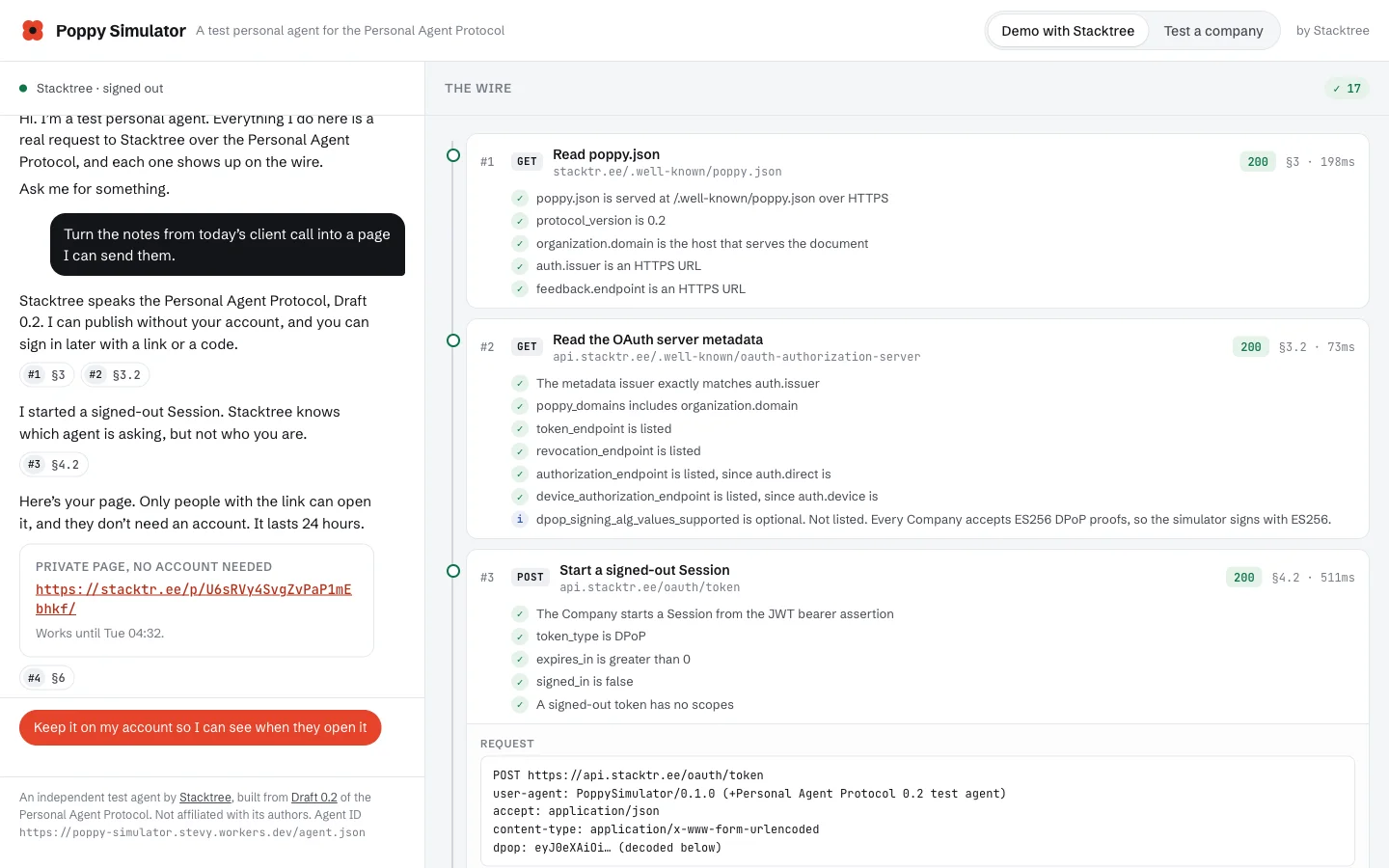
It has two modes.
- Demo with Stacktree. A scripted chat with a personal agent, beside the live wire. You ask it to turn notes from a client call into a page. It reads Stacktree's
poppy.json, starts a signed-out Session, publishes a 24-hour page and hands you the link. Ask it to keep the page on your account and it offers Device Sign-In, a code and a QR code for your phone, or Direct Sign-In on the same device. Then it claims the page onto your account. Ask it to schedule the page for Monday and it tells you Stacktree can't, and offers to report that through the protocol's feedback endpoint. Ask it to sign out and it revokes its Account Token. - Test a company. Enter any domain that serves a
poppy.json. It runs discovery, a signed-out Session, the company's MCP server or another API the company lists, and a set of requests the company must refuse, 14 checks in all. Sign-in runs when you click.
Every request shows its method, URL, headers and body, the response, and the section of the spec it follows. Signed JWTs are shown decoded, header and claims, with the signature left out. Tokens are cut to their first eight characters. The run is sealed with AES-GCM and travels with each step, so the server keeps nothing between requests and the page in your browser never holds a token it could leak.
It also can't be turned into a tool for anything else. It publishes fixed demo content only, never HTML a visitor supplies. It sends requests only over HTTPS, only to public host names, and only to hosts the company's own metadata vouches for: its domain, its issuer and its poppy_domains.
Running Stacktree through it
On 19 October we pointed it at production Stacktree for everything that needs no person: discovery, a signed-out Session, a signed-out publish, the MCP server, a Device Sign-In code, one feedback report, and the refusal probes. Forty-one checks passed, two were informational and one was a warning, with no failures.
- Discovery (sections 3 to 3.2): 11 passes.
protocol_versionis 0.2, the OAuth metadata'sissuermatchesauth.issuerexactly, andpoppy_domainsincludes stacktr.ee. The one note is that we don't list DPoP algorithms, which 0.2 made optional as long as ES256 works. - Signed-out Session (4.2, 4.3): a DPoP-bound token with no scopes and
signed_in: false. - Publish, signed out (6): a private page, live for 24 hours, no account involved.
- Device Sign-In (4.6): a code, an interval and a link on our own domain.
- Feedback (8): 202 with no body, as the spec asks.
- Refusals: all 14 refusal checks passed. They included a reused assertion, an assertion whose
audwas the token endpoint instead of the issuer, a replayed DPoP proof, a proof for the wrong URL, an assertion valid for an hour instead of five minutes, a Bearer token sent to the REST API, and a Session renewed as a different person.
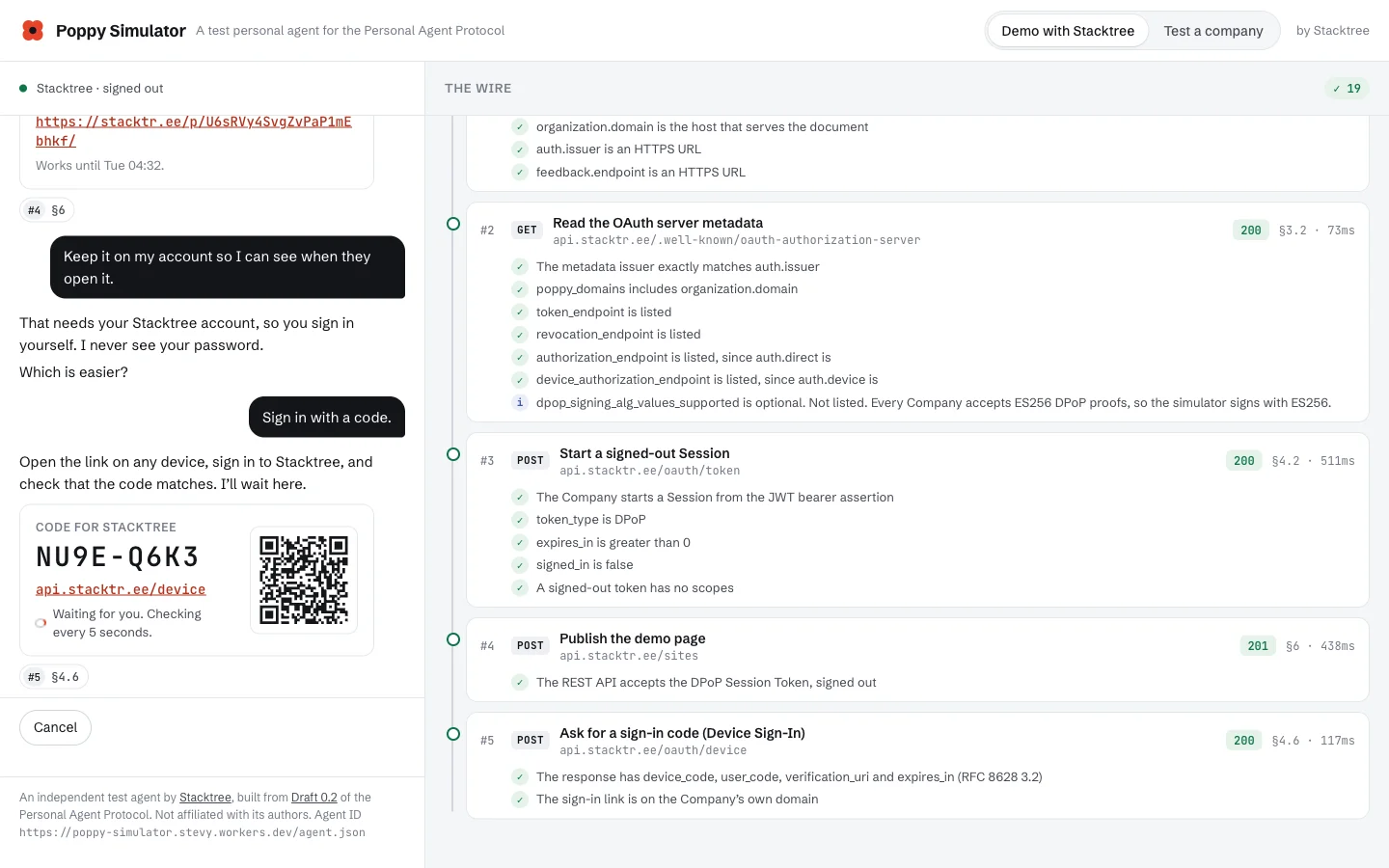
The parts that need a person run in our test suite, where the simulator drives the whole Stacktree worker. That includes Direct Sign-In with PKCE and the issuer check on the way back, Device Sign-In approved for reading only, claiming the page onto the account, a new Session from the Account Token, and signing out. Of 112 checks, 102 passed, 9 were informational and 1 was a warning, with no failures. Those 15 tests stay in the suite, so the next change to our server meets an agent that never read our code.
What it caught
No failures doesn't mean nothing to fix. Three things came out of building and running it.
Our MCP server shut the door on signed-out agents. A signed-out Session can publish over REST, but our MCP server answered even initialize with sign_in_required. A signed-out agent couldn't see that a publish_html tool existed. Section 6 allows a company to require sign-in, so it's a warning, not a failure. It's still the wrong first impression for an agent deciding whether a company can help, and we plan to let a signed-out Session list our tools and ask it to sign in only for the calls that need an account.
A secret in three places. When an agent publishes without an account, our response carries a claim token: the key to update or keep that page. The simulator's first trace redacted fields by name, claim_token among them, and still leaked the token, because it also sits inside claim_url and keep_url. Any agent that logs responses would make the same mistake. The simulator now scrubs every secret it holds by value, wherever it appears. If you build an agent, redact by value, not by field name.
A rule the draft doesn't have yet. During Device Sign-In, the company tells the agent which link to show the person. Draft 0.2 doesn't ask the agent to check that the link is on the company's own domain. A compromised or malicious response could send someone to a lookalike sign-in page, and the person would trust it because their agent showed it. The simulator checks the link against the issuer's host and poppy_domains anyway, as a safety measure. We expect to suggest it for the spec.
Point it at your own company
If you serve a poppy.json, open the simulator, choose Test a company and enter your domain. You get the checklist in a few seconds, with each request expandable. To try sign-in, click a sign-in button and approve on your own page with a test account. Your consent screen will show the simulator's name and its host, which is the point: you see what a person sees.
Two practical notes. Your server has to fetch https://poppy-simulator.stevy.workers.dev/agent.json and its key set, so an allowlist of known agents will need it added. And because every visitor shares one agent, a company that rate-limits per agent may see the simulator hit that limit on a busy day. That's worth knowing about your own limits, too: a single popular personal agent will look like this.
What we learned building both sides
Writing an agent after writing a company changes how you read the spec. A few things that stood out:
- Identity is a URL, and that's a hosting problem. A personal agent's
client_idis the HTTPS URL of its metadata, and its sign-in callback and key set have to sit on the same domain. That's a clean design for production agents and a real hurdle for anyone experimenting on a laptop. A hosted test agent removes it. - Device Sign-In is the flow agents will need most. An agent in a chat app, on a call or on glasses has nowhere to send a browser redirect. Showing a code the person types on their phone works anywhere, and it's the first flow we'd ask any company to support.
- Ask for less, and let the person choose. Both our consent screens now let the person untick a scope. The simulator's Device Sign-In test approves read only, and the agent has to cope with a token that can't publish.
- The feedback endpoint is the part companies will learn the most from. Draft 0.2 lets an agent report a task the company can't do at all. The simulator's "schedule it for Monday" step is a real request a person might make, and the report goes to the people who build Stacktree. We now take the same report from any agent, over our MCP server and REST API as well.
We were early to MCP and to WebMCP for the same reason we built this. When agents arrive at a company, the companies that already speak their protocol are the ones those agents can use. We'd rather find our own mistakes before the first real agent does.
Frequent questions
What is the Personal Agent Protocol (Poppy)? +
Is there a test agent for the Personal Agent Protocol? +
How do I test my Poppy implementation? +
What is Device Sign-In in the Personal Agent Protocol? +
What is the difference between Poppy and MCP? +
Does the simulator publish anything or keep my data? +
Is Poppy Simulator affiliated with Meta or Sierra? +
Related guides
- Stacktree for AI agents Every way an agent reaches Stacktree: the Personal Agent Protocol, MCP, REST, skills and x402.
- WebMCP in production How the Stacktree dashboard hands its actions to the agent in your browser.
- MCP spec changes in 2026 The other protocol a Poppy company can offer behind its Sessions.
- Why agents need a publish primitive The thesis under every agent surface we build.
Sources and further reading
- Personal Agent Protocol specification ↗ The draft the simulator follows: discovery, Sessions, Direct and Device Sign-In, APIs, feedback and security.
- Introducing Personal Agent Protocol (Sierra) ↗ The 6 October 2026 announcement from Sierra, developing the protocol with Meta and industry partners.
- Personal Agent Protocol Company kit ↗ The official implementation skill and command-line validator for companies.
- Personal Agent Protocol repository ↗ The spec source, its history and the open topics: payments, push notifications and attachments.
- Awesome Poppy ↗ A community list of Poppy SDKs, demos, checkers and live implementations.
- RFC 8628: OAuth 2.0 Device Authorization Grant ↗ The grant behind Device Sign-In.
- RFC 9449: OAuth 2.0 Demonstrating Proof of Possession (DPoP) ↗ How Session Tokens are bound to the agent's key.
Ready for the first agent that shows up.
Private pages an agent can publish with or without an account, over the Personal Agent Protocol, MCP or HTTP. Free to start, no card.
Sign up free →